OGPを設定したい
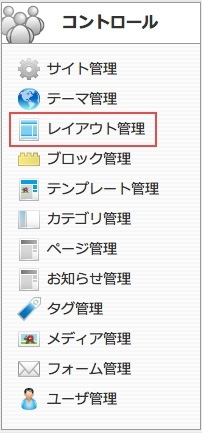
コントロールパネルから【レイアウト管理】を選択します。
該当するレイアウトの編集アイコンをクリックしてください。
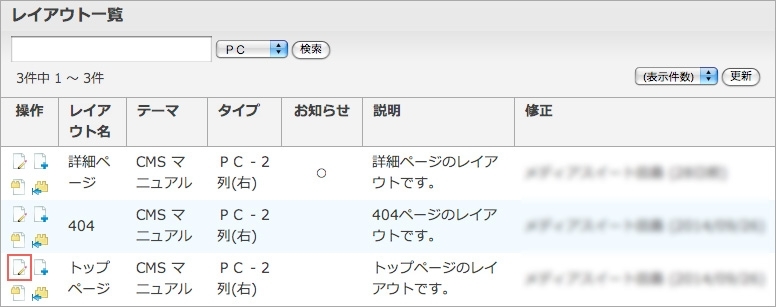
【レイアウト編集】を選択してください。
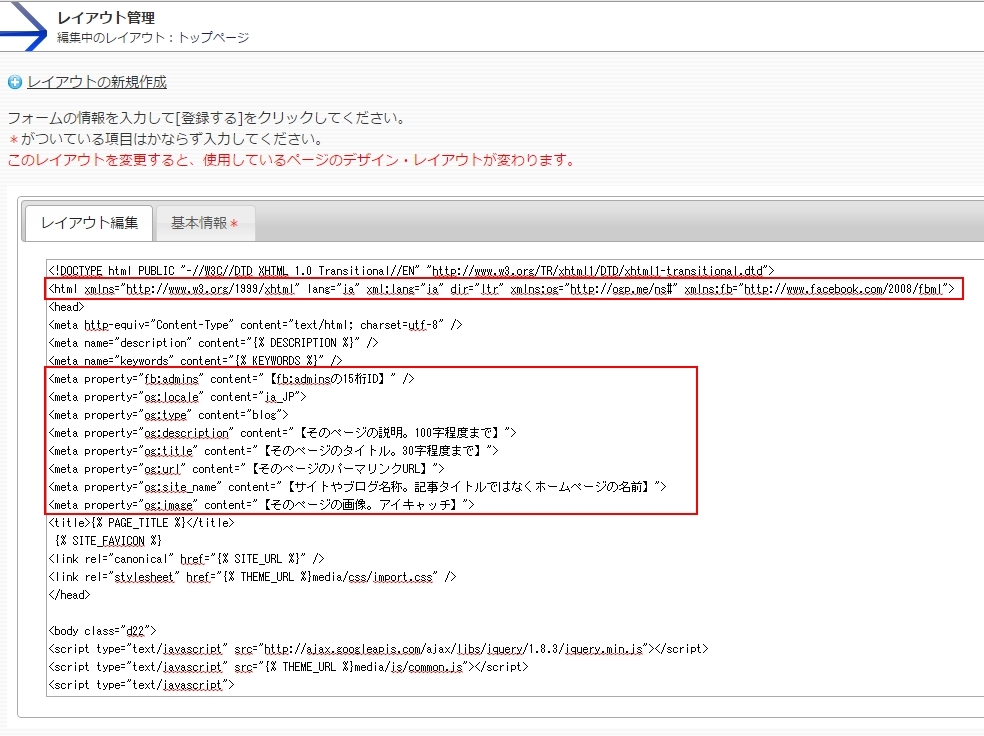
1)HTMLファイルの下記のタグを変更する
<html xmlns="http://www.w3.org/1999/xhtml">
↓
<html xmlns="http://www.w3.org/1999/xhtml" lang="ja" xml:lang="ja" dir="ltr" xmlns:og="http://ogp.me/ns#" xmlns:fb="http://www.facebook.com/2008/fbml">
-----------------------------------------------------------------------------------------------------------------------
2)headタグ内に次の内容を記述して下さい。【】で囲んだ内容はあなたのサイトに合わせて必ず書きなおして下さい。
<meta property="fb:admins" content="【fb:adminsの15桁ID】" /><meta property="og:locale" content="ja_JP">
<meta property="og:type" content="blog">
<meta property="og:description" content="【そのページの説明。100字程度まで】">
<meta property="og:title" content="【そのページのタイトル。30字程度まで】">
<meta property="og:url" content="【そのページのパーマリンクURL】">
<meta property="og:site_name" content="【サイトやブログ名称。記事タイトルではなくホームページの名前】">
<meta property="og:image" content="【そのページの画像。アイキャッチ】">
【登録する】ボタンをクリックすると、ogp設定ができます。

サイト管理
ブロック管理
テンプレート管理
ページ管理
お知らせ管理
フォーム管理
ユーザー管理